

Google Whisk AI represents a paradigm shift in how we approach creative visual content generation. Unlike traditional AI image generators that rely heavily on text prompts, Whisk allows users to create and remix images using other images as inputs, making the creative process more intuitive and visually driven.
What is Google Whisk AI?
Google Whisk AI is an experimental visual creation tool developed by Google Labs that enables users to generate new images by combining and remixing existing visual elements. Launched in December 2024, Whisk utilizes Google’s advanced Gemini AI models alongside Imagen 3 to interpret visual inputs and create unique compositions.
Rather than typing lengthy descriptive prompts, users can simply drag and drop images representing their desired subject, scene, and style. Whisk then analyzes these visual references and generates creative outputs that blend these elements in novel ways.
Pro-Tip: Whisk works best when you provide clear, distinct images for each element (subject, scene, style). Avoid images with multiple focal points or cluttered backgrounds for optimal results.
How Google Whisk AI Works
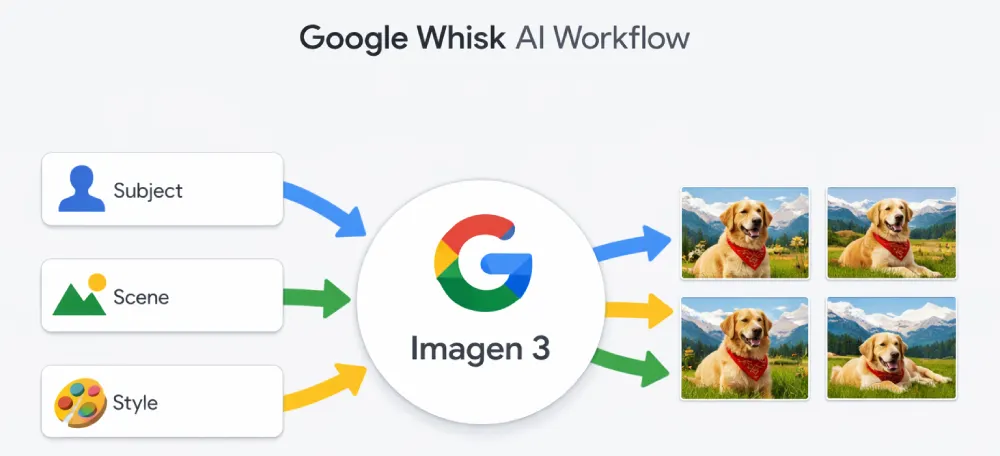
Whisk’s underlying architecture combines multiple AI models to deliver its visual remixing capabilities:
The Technical Foundation
Whisk uses Gemini’s multimodal understanding to automatically generate detailed text descriptions of your input images. These descriptions are then fed to Imagen 3, Google’s state-of-the-art image generation model, which creates the final output.
This two-stage process allows Whisk to understand the semantic meaning of visual inputs while leveraging Imagen 3’s powerful generation capabilities. The system can identify subjects, extract stylistic elements, and understand scene composition without requiring users to articulate these concepts in words.
The Three-Input System
Whisk operates on a simple yet powerful three-component framework:
Subject: The main focus of your image – what you want to feature prominently. This could be a person, object, character, or any primary element.
Scene: The environment or setting where your subject appears. This defines the background, context, and spatial arrangement of your composition.
Style: The artistic approach, aesthetic quality, or visual treatment you want applied to the final image. This influences colors, textures, rendering techniques, and overall visual mood.
Pro-Tip: You can leave any of the three inputs empty, and Whisk will generate content for that element. However, providing all three inputs typically yields more predictable and controlled results.
Key Features and Capabilities
Visual-First Creation Process
Whisk eliminates the need for prompt engineering expertise. Users can communicate their creative vision through images rather than words, making the tool accessible to visual thinkers and those less comfortable with text-based interfaces.
Rapid Iteration and Experimentation
The tool encourages creative exploration by allowing quick experimentation with different combinations. Users can swap out subjects, scenes, or styles in seconds to see how different elements interact.
Automatic Prompt Generation
Behind the scenes, Whisk generates detailed text descriptions of your images. Users can view and edit these automatically generated prompts to fine-tune outputs, providing a bridge between visual and textual control.
Multiple Style Applications
Whisk excels at style transfer, allowing users to apply the aesthetic qualities of one image to completely different subjects and scenes. This makes it particularly powerful for maintaining consistent visual branding across varied content.
Comparison: Google Whisk AI vs. Traditional AI Image Generators
| Feature | Google Whisk AI | Traditional AI Generators (MidJourney, DALL-E) |
| Primary Input Method | Visual (drag-and-drop images) | Text prompts |
| Learning Curve | Low – intuitive visual interface | Medium to High – requires prompt engineering |
| Creative Control | Component-based (subject, scene, style) | Keyword and parameter-based |
| Best For | Visual remixing, style transfer, quick iterations | Precise descriptions, complex scenes from imagination |
| Prompt Engineering Required | Optional (auto-generated from images) | Essential for quality results |
| Experimentation Speed | Very fast – swap images instantly | Slower – requires rewriting prompts |
| Consistency Across Variations | High – visual references ensure consistency | Variable – depends on prompt precision |
Practical Use Cases for Google Whisk AI
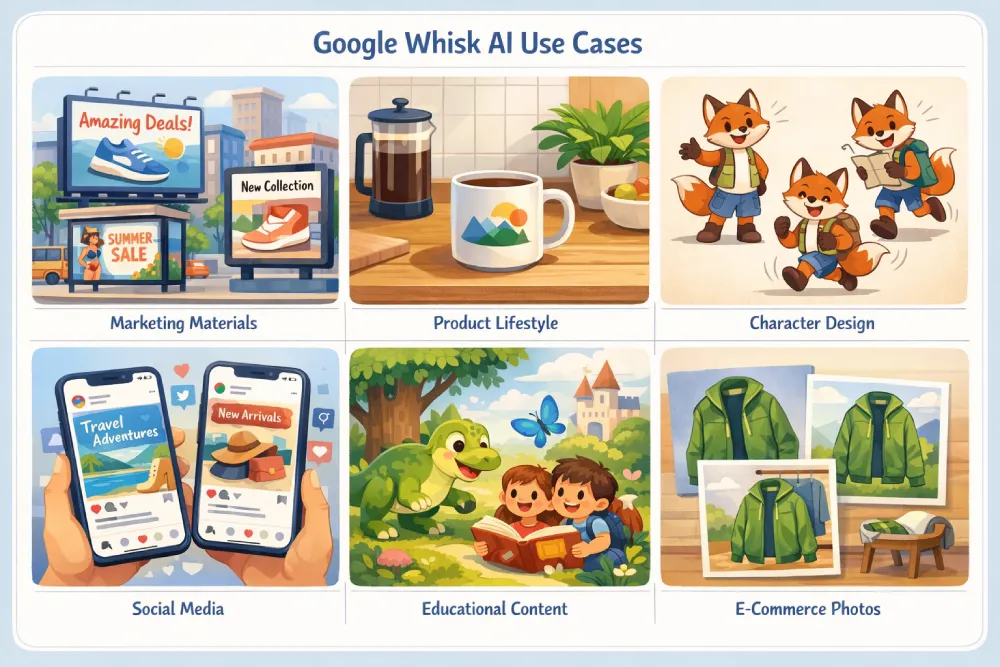
Marketing and Branding
Whisk enables marketers to quickly generate branded visual content by defining a consistent style template and applying it across different subjects and contexts. This ensures visual cohesion across campaigns without requiring extensive design work.
Product Visualization
E-commerce businesses can use Whisk to place products in various lifestyle settings or apply different aesthetic treatments to product photography, creating diverse marketing assets from limited source materials.
Character Design and Concept Art
Artists and designers can rapidly explore character variations by maintaining a consistent character (subject) while experimenting with different environments (scenes) and artistic styles. This accelerates the concept development process significantly.
Social Media Content Creation
Content creators can maintain visual consistency across posts by using Whisk to generate variations on a theme. Apply your signature style to different subjects and scenes to create a cohesive feed aesthetic.
Pro-Tip: Save your most successful style images as templates. When you find a visual treatment that resonates with your audience, reuse it as the style input for future Whisk creations to maintain brand consistency.
Educational Materials
Educators can create custom illustrations for teaching materials by combining educational subjects with appropriate scenes and age-appropriate artistic styles, making learning content more engaging and visually accessible.
Step-by-Step Guide: Using Google Whisk AI
Getting Started
Visit the Google Labs website and access Whisk through your Google account. The tool is currently available in experimental form, which means access may be limited based on availability and regional restrictions.
Creating Your First Whisk
Step 1: Select or upload an image for your subject. This should clearly depict the main element you want in your final image. If you don’t have an image, you can describe what you want, and Whisk will generate a subject for you.
Step 2: Add a scene image that represents the environment or setting you envision. This could be a photograph of a location, an illustration of a setting, or any image that conveys the spatial context.
Step 3: Choose a style reference image that captures the aesthetic qualities you want applied. This might be artwork, photography, or any image with the visual treatment you’re aiming for.
Step 4: Click generate and wait for Whisk to process your inputs. The tool will analyze all three components and create multiple variations for you to review.
Step 5: Review your results. Whisk typically generates several options based on your inputs. You can select your favorite or generate additional variations.
Refining Your Results
If the initial output isn’t quite what you envisioned, you can edit the automatically generated prompts. Click on any of the generated descriptions to modify them with additional details or constraints. This hybrid approach combines the intuitive nature of visual inputs with the precision of text refinement.
You can also swap individual components – change just the subject, scene, or style while keeping the other elements constant to see how different combinations work together.
Advanced Tips and Techniques
Optimizing Your Input Images
For best results, use high-quality images with clear subjects and uncluttered backgrounds. Whisk’s AI performs better when it can easily identify and isolate the key elements in your reference images.
Avoid images with multiple competing subjects or complex, busy compositions. The clearer your visual intent, the more accurately Whisk can interpret and apply your desired elements.
Creating Style Libraries
Build a collection of style reference images that represent different aesthetic approaches. This allows you to quickly apply consistent treatments across projects and maintain visual branding.
Pro-Tip: Test your style references with simple subjects first. This helps you understand how Whisk interprets each style before applying it to more complex creative projects.
Combining Whisk with Other Tools
Whisk outputs can serve as starting points for further refinement in traditional image editing software. Generate your base composition in Whisk, then polish details, adjust colors, or add text overlays in Photoshop or similar tools.
Understanding Limitations
Whisk works within the capabilities and limitations of Imagen 3. It may struggle with highly specific technical details, precise text rendering within images, or very complex multi-element compositions. Understanding these boundaries helps set realistic expectations.
Privacy and Copyright Considerations
Data Usage
When using Google Whisk AI, be aware that Google may use your inputs and interactions to improve the service. Review Google’s privacy policies and terms of service for details on data handling.
Copyright and Ownership
The copyright status of AI-generated images remains a evolving legal landscape. While you provide the inputs, the AI generates the output using its training data. Consider consulting legal guidance for commercial applications.
Responsible Use
Avoid uploading images containing identifiable people without proper consent, copyrighted material you don’t have rights to use, or sensitive content. Responsible use protects both you and others in the creative community.
The Future of Visual AI Tools
Google Whisk AI represents an important direction in AI-assisted creativity – moving from text-centric interfaces toward more intuitive visual workflows. As these tools evolve, we can expect even more sophisticated understanding of visual concepts and greater control over generation parameters.
The integration of multimodal AI models like Gemini with specialized generation systems like Imagen 3 points toward a future where creative tools understand and work with information in whatever form users find most natural – whether that’s text, images, voice, or combinations of all three.
Pro-Tip: Stay updated on Whisk’s development by following Google Labs announcements. Experimental tools often receive significant updates and new features based on user feedback and technological advances.
Common Questions About Google Whisk AI
Is Google Whisk AI free to use?
As an experimental Google Labs project, Whisk is currently available without charge to users who can access it. However, availability may be limited, and Google could introduce usage limits or pricing in the future as the tool evolves from experimental to production status.
Can I use Whisk-generated images commercially?
The commercial use terms depend on Google’s specific licensing for AI-generated content. Always review the most current terms of service before using generated images in commercial applications. The legal framework for AI-generated content ownership continues to develop.
What makes Whisk different from other AI image generators?
Whisk’s distinguishing feature is its visual-first input method. Rather than requiring detailed text prompts, it allows users to communicate their creative intent through image references, making the tool more intuitive for visual thinkers and reducing the learning curve associated with prompt engineering.
How accurate is Whisk at interpreting my input images?
Whisk uses Google’s Gemini AI for image understanding, which provides sophisticated interpretation of visual content. However, like all AI systems, interpretation accuracy varies based on image clarity, complexity, and how well-defined your visual references are.
Maximizing Creative Output with Whisk
Developing Your Visual Vocabulary
As you work with Whisk, you’ll develop an understanding of how different types of images work as inputs. Some images make excellent style references but poor subjects, while others excel as scene setters but don’t transfer well as stylistic influences.
Experiment systematically to build your intuition. Try the same subject with multiple different style references to see how each transforms the output. This experimentation builds valuable knowledge about the tool’s capabilities and quirks.
Workflow Integration
Consider where Whisk fits in your broader creative workflow. It excels as an ideation tool, allowing rapid exploration of visual concepts before committing to more time-intensive production work.
Some creators use Whisk for initial concept development, generating multiple variations quickly to present to clients or teams. Once a direction is selected, traditional design tools can be used for refinement and finalization.
Collaborative Applications
Whisk’s visual interface makes it excellent for collaborative creative work. Team members can communicate ideas by sharing reference images rather than trying to articulate complex visual concepts in words. This reduces miscommunication and accelerates the creative development process.
Technical Requirements and Accessibility
Google Whisk AI runs entirely through a web browser, requiring no local software installation or high-end hardware. This browser-based approach makes the tool accessible from virtually any modern device with internet connectivity.
The tool works on desktop computers, tablets, and even smartphones, though the experience is optimized for larger screens where you can more easily view and compare generated variations.
Pro-Tip: For the best experience, use a device with a large display and a fast internet connection. While Whisk works on mobile devices, the larger workspace of a desktop or tablet makes it easier to compare results and manage multiple image inputs.
Conclusion
Google Whisk AI represents an exciting evolution in AI-powered creative tools, offering an intuitive visual-first approach to image generation and remixing. By allowing users to communicate through images rather than text prompts, Whisk democratizes AI-assisted creativity and opens new possibilities for rapid visual experimentation.
Whether you’re a marketer seeking consistent branded content, a designer exploring concept variations, or a content creator building a cohesive visual identity, Whisk provides a powerful tool for visual exploration and creation. As Google continues developing this experimental technology, we can expect even more sophisticated capabilities and refined control.
The key to success with Whisk lies in understanding its component-based approach, building a library of effective reference images, and embracing the experimental nature of the tool. Start with simple projects, learn how different inputs affect outputs, and gradually incorporate Whisk into your creative workflow where it provides the most value.
Ready to explore more innovative AI tools and creative strategies? Visit GreatInspire.com for comprehensive guides, tutorials, and inspiration for your digital creative journey.