

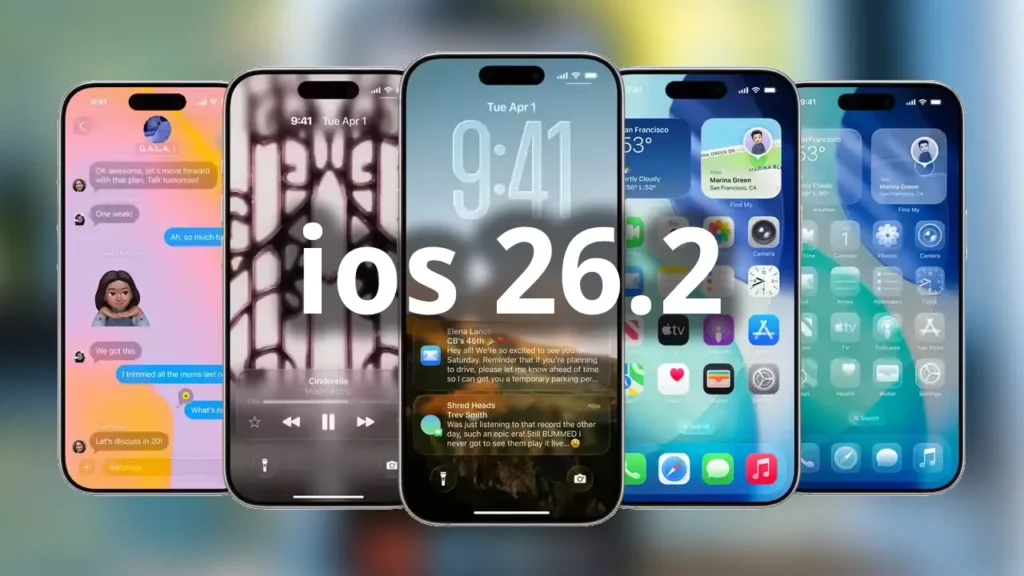
The latest iOS update 26.2 has arrived, bringing exciting refinements and new capabilities to your iPhone. Released by Apple in December 2025, this iOS update introduces enhanced customization options, improved productivity features, and valuable quality-of-life improvements that iPhone users have been requesting. Whether you’re eager to customize your Lock Screen with Liquid Glass adjustments, enjoy offline lyrics in Apple Music, or leverage new gaming features, this comprehensive guide covers everything you need to know about the iOS update 26.2.
Understanding the iOS Update 26.2 Release
Apple’s iOS update 26.2 marks the second major point release since iOS 26 launched in September 2025. This update demonstrates Apple’s commitment to refining user experience while introducing meaningful enhancements across native applications. The iOS update focuses on personalization, productivity, and seamless integration, addressing user feedback from the initial iOS 26 release.
Compatible with iPhone models from the iPhone 11 series through the latest iPhone 17 series, this iOS update ensures millions of Apple users can access these improvements. The update includes critical security patches, bug fixes, and feature additions that enhance daily iPhone usage.
Why This iOS Update Matters for Apple Users
Unlike minor maintenance updates, iOS 26.2 introduces tangible improvements that impact how you interact with your device daily. From customizable Lock Screen aesthetics to productivity enhancements in Reminders and Podcasts, Apple has listened to user feedback and delivered practical solutions. The iOS update also expands gaming capabilities and introduces safety features specifically designed for U.S. users.
iOS 26.2: Key Features and What’s New
Liquid Glass Lock Screen Customization
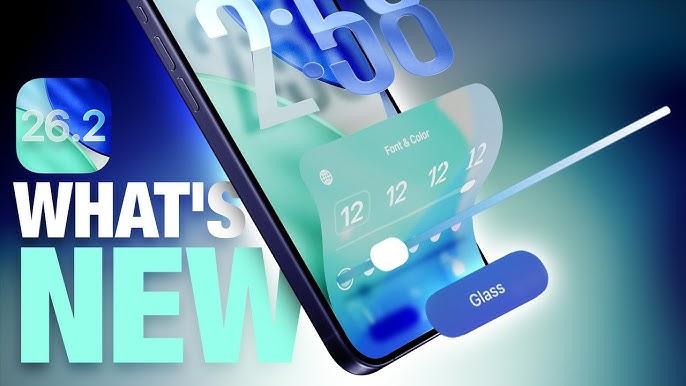
One of the standout features in this iOS update is the new slider in the Lock Screen customization menu that lets you adjust the opacity of Liquid Glass for the clock. This enhancement gives you complete control over how clear or frosted your Lock Screen time display appears.
The new customization option comes after iOS 26.1 added “Clear” and “Tinted” options for Liquid Glass, and now Apple provides even more granular control. You can find this setting by:
- Long-pressing on your Lock Screen
- Tapping “Customize”
- Selecting the clock element
- Using the new opacity slider to adjust the Liquid Glass effect
This feature allows iPhone users to balance aesthetics with functionality, ensuring your wallpaper remains visible while maintaining readable clock text.
Apple Music Offline Lyrics
iOS 26.2 adds offline lyric support to Apple Music, allowing you to view a song’s lyrics even when you are not connected to a Wi-Fi or cellular network. This long-requested feature is perfect for:
- Commuters in subway systems without connectivity
- Travelers on airplanes
- Users in areas with poor cellular coverage
- Anyone wanting to sing along without burning data
The offline lyrics feature automatically downloads lyric data when you download songs for offline listening, making it seamless and intuitive.
Enhanced Podcasts Experience
The iOS update 26.2 brings three significant improvements to Apple‘s Podcasts app:
Automatically Generated Chapters: Automatically generated chapters make it easier to navigate episodes, allowing you to jump to specific topics without manual scrubbing.
Timed Links: Visual links appear on screen at relevant moments during playback, providing additional context and resources.
Podcast Discovery: Links to mentioned podcasts let you see and follow other podcasts mentioned in the episode you’re listening to directly from the player and transcript.
Reminders App Gets Alarms
Alarms for Reminders help you stay on top of urgent tasks, and provide snooze and Live Activity support. This feature bridges the gap between Reminders and the Clock app, offering:
- Audible alerts for time-sensitive tasks
- Snooze functionality
- Live Activities on your Lock Screen
- Integration with Focus modes
To set an alarm for a reminder:
- Create or edit a reminder
- Add a time
- Toggle the “Urgent” option
- The alarm will sound at the designated time
Gaming Improvements
Apple has significantly enhanced the gaming experience in this iOS update with several key features:
Library Filters: Filters in the Games library let you find games by category, size, and more, making it easier to manage large game collections.
Challenge Banners: In-game challenge score banners provide real-time updates when someone new has taken the lead, keeping competitive gameplay exciting and immediate.
Controller Support: Improved support for connected controllers such as Backbone and Razer enhances console-quality gaming on iPhone.
AirDrop Security Enhancement
AirDrop codes offer an additional layer of verification when using AirDrop with unknown contacts by providing a code on the receiver’s device that the sender must enter to complete the transfer. This security feature prevents unwanted AirDrop requests in public spaces while maintaining convenience for known contacts.
Apple News Redesigned Navigation
Apple News Section links at the top of the Today feed offer easy navigation to popular topics like Sports, Politics, Business, and Food. This streamlined interface makes it faster to access your preferred content categories without excessive scrolling.
Enhanced Safety Alerts (U.S. Only)
Enhanced Safety Alerts can inform you about imminent threats such as floods, natural disasters, and other emergencies, with rich information like a map of affected areas and links to additional safety guidance. This feature is currently available in the United States and provides critical information during emergency situations.
Additional Features and Improvements
Accessibility Enhancement: Flash for alerts in Accessibility Settings offers the additional option to have the device screen flash when you receive a notification, expanding beyond the existing LED flash option.
Freeform Tables: Tables in Freeform can hold text, images, documents, and drawings, with cells that intelligently resize to fit, bringing structure to the infinite canvas.
Home App Multipack Pairing: Multipack accessory pairing in the Home app lets you use the same setup code to easily enroll multiple accessories when sold together.
Secondary Features: iPhone Software Optimization
Apple Music Enhancements
Beyond offline lyrics, the iOS update introduces the Favorite Songs playlist appearing in Top Picks on the home tab, making your most-loved music more accessible. Apple has also addressed a bug where pre-release albums weren’t immediately playable at their release time.
System-Wide Improvements
Apple has refined various aspects of the iOS operating system:
- Improved system stability
- Enhanced battery management
- Optimized performance for older iPhone models
- Critical security patches protecting against vulnerabilities
Bug Fixes in iOS Update 26.2
The update fixes an issue where a Privacy and Security setting may incorrectly be marked as managed by an enterprise organization. This resolves confusion for users who aren’t part of corporate device management programs.
Compatible iPhone Models for iOS Update 26.2
This iOS update supports a wide range of iPhone models:
Latest iPhone Models
- iPhone 17 Pro Max
- iPhone 17 Pro
- iPhone 17
- iPhone Air
iPhone 16 Series
- iPhone 16 Pro Max
- iPhone 16 Pro
- iPhone 16 Plus
- iPhone 16
- iPhone 16e
iPhone 15 Series
- iPhone 15 Pro Max
- iPhone 15 Pro
- iPhone 15 Plus
- iPhone 15
iPhone 14 Series
- iPhone 14 Pro Max
- iPhone 14 Pro
- iPhone 14 Plus
- iPhone 14
iPhone 13 Series
- iPhone 13 Pro Max
- iPhone 13 Pro
- iPhone 13
- iPhone 13 mini
iPhone 12 Series
- iPhone 12 Pro Max
- iPhone 12 Pro
- iPhone 12
- iPhone 12 mini
Older Compatible Models
- iPhone 11 Pro Max
- iPhone 11 Pro
- iPhone 11
- iPhone SE (3rd generation)
- iPhone SE (2nd generation)
How to Install iOS Update 26.2: Step-by-Step Guide
Pre-Installation Checklist
Before installing the iOS update, ensure you complete these important steps:
- Backup Your iPhone: Use iCloud or iTunes/Finder to create a complete backup
- Check Storage Space: Ensure at least 5GB of available storage
- Verify Battery Level: Charge to at least 50% or connect to power
- Connect to Wi-Fi: Stable internet connection required for download
Installation Method 1: Over-the-Air (Recommended)
- Open the Settings app on your iPhone
- Navigate to General > Software Update
- Tap Download and Install when iOS 26.2 appears
- Enter your passcode if prompted
- Agree to terms and conditions
- Tap Install Now or schedule installation for later
- Your iPhone will restart to complete the installation
The iOS update download typically takes 10-30 minutes depending on your internet speed, with installation requiring an additional 10-15 minutes.
Installation Method 2: Using a Computer
For Mac users (macOS Catalina or later):
- Connect iPhone to Mac using a cable
- Open Finder
- Select your iPhone from the sidebar
- Click Check for Update
- Click Download and Update
- Follow on-screen instructions
For Windows users or older Mac systems:
- Install the latest version of iTunes
- Connect your iPhone
- Click the iPhone icon
- Select Check for Update
- Click Download and Update
Installation Method 3: IPSW Firmware Files (Advanced Users)
Advanced users can manually install using IPSW files from Apple’s servers. This method requires:
- Downloaded IPSW file for your specific iPhone model
- iTunes or Finder connection
- Option-click (Mac) or Shift-click (Windows) on Update button
- Select the downloaded IPSW file
Note: This method is recommended only for experienced users or troubleshooting situations.
iOS Update 26.2 vs iOS 26.1: What’s Different?
New Features Exclusive to 26.2
- Liquid Glass opacity slider (26.1 only had Clear/Tinted options)
- Offline Apple Music lyrics
- Podcast chapters and discovery features
- Reminders alarms functionality
- AirDrop verification codes
- Enhanced Safety Alerts
- Gaming library filters and challenge banners
Improvements Over Previous Versions
iOS 26.2 builds upon iOS 26.1’s foundation while addressing user feedback about customization limitations and missing productivity features. The update represents Apple’s iterative approach to perfecting the iOS 26 experience.
Troubleshooting Common iOS Update Issues
Update Won’t Download
Solutions:
- Verify sufficient storage space (Delete unused apps temporarily)
- Restart your iPhone
- Check internet connection stability
- Try updating during off-peak hours
Installation Fails or Freezes
Solutions:
- Force restart your iPhone (varies by model)
- Delete the downloaded update and try again (Settings > General > iPhone Storage > iOS 26.2)
- Update via computer using iTunes/Finder
- Contact Apple Support if issue persists
Battery Draining After Update
Normal behavior immediately after updating:
- Background indexing and optimization occur for 24-48 hours
- Allow your iPhone to complete these processes
- Battery performance should normalize afterward
If persistent:
- Check battery health (Settings > Battery > Battery Health)
- Identify apps with excessive battery usage
- Consider resetting all settings
Apps Not Working Properly
Solutions:
- Update all apps to latest versions
- Clear app cache by deleting and reinstalling
- Check App Store for compatibility updates
- Wait for developer updates if widespread issue
Should You Install iOS Update 26.2?
Reasons to Update Immediately
Security: The iOS update includes critical security patches protecting against vulnerabilities. Apple recommends installing security updates promptly.
New Features: If you use Apple Music extensively, enjoy podcasts, or manage tasks with Reminders, the new features provide immediate value.
Bug Fixes: Fixes address issues with pre-release albums in Apple Music and Privacy settings incorrectly marked as managed.
Stability: Point updates typically improve system stability and performance.
Reasons to Wait
Mission-Critical Device: If your iPhone is essential for work and you can’t afford downtime, wait a few days to ensure no widespread issues emerge.
App Compatibility: If you rely on specialized apps, verify they’re compatible with iOS 26.2 before updating.
Limited Storage: If storage space is tight, manage files before updating.
Expert Tips for Getting the Most from iOS Update 26.2
Maximize Lock Screen Customization
Experiment with the new Liquid Glass opacity slider to find your perfect balance. Try:
- Maximum opacity for wallpapers with busy patterns
- Minimal opacity for minimalist wallpapers
- Medium opacity for the best of both worlds
Leverage Offline Apple Music Lyrics
Before your next flight or commute:
- Download your favorite playlists
- Verify lyrics are available
- Enjoy sing-along sessions without connectivity
Organize with Reminders Alarms
Transform your Reminders app into a comprehensive task management system:
- Use alarms for time-critical tasks
- Standard reminders for flexible tasks
- Combine with Focus modes for maximum productivity
Enhance Gaming Experience
Take advantage of improved controller support:
- Pair Backbone or Razer controllers
- Explore Apple Arcade games with controller support
- Use library filters to quickly find controller-compatible games
What’s Next: Future iOS Updates
Apple typically releases iOS updates on a regular schedule:
iOS 26.3: Expected in early 2026 with additional refinements iOS 27: Major annual release anticipated September 2026
Stay informed about future updates by:
- Enabling automatic downloads (Settings > General > Software Update)
- Following Apple’s newsroom
- Subscribing to iOS update notifications
Frequently Asked Questions About iOS Update 26.2
Q: How long does iOS 26.2 installation take? A: Typically 20-45 minutes total, including download time depending on internet speed.
Q: Will I lose data updating to iOS 26.2? A: No, updates preserve all data. However, always backup before updating as a precaution.
Q: Can I downgrade from iOS 26.2? A: Apple typically stops signing previous versions within weeks of new releases, making downgrades difficult.
Q: Is iOS 26.2 faster than iOS 26.1? A: Users report improved performance, particularly in system animations and app launching.
Q: Does iOS 26.2 support all iPhone 11 models? A: Yes, iPhone 11, 11 Pro, and 11 Pro Max all support iOS 26.2.
Conclusion: Should Apple Users Install This iOS Update?
The iOS update 26.2 represents a meaningful refinement of the iOS 26 experience. With practical features like offline Apple Music lyrics, Reminders alarms, and enhanced Lock Screen customization, this update delivers tangible value to iPhone users. The inclusion of critical security patches makes installation advisable for most users.
For Apple users seeking improved productivity, enhanced entertainment features, and the latest security protections, iOS update 26.2 is a recommended installation. The update demonstrates Apple’s commitment to iterative improvement and user-focused design.
Take Action: Download iOS Update 26.2 Today
Ready to experience the latest iPhone features? Installing iOS update 26.2 is simple:
- Backup your device using iCloud or your computer
- Connect to Wi-Fi and ensure sufficient battery
- Navigate to Settings > General > Software Update
- Download and install iOS 26.2
Stay ahead of the curve with Apple’s latest software innovations. Install iOS update 26.2 today and discover how these enhancements can improve your daily iPhone experience.
Subscribe to our newsletter for more iOS tips, comprehensive Apple guides, and timely update notifications. Stay informed about future iOS releases, hidden features, and expert troubleshooting advice delivered directly to your inbox.